


Archive for the ‘ipad’ Category
Indie Sixy Times
Tuesday, July 15th, 2014
Last week was the sixth anniversary of the start of my journey into independent game development. Every year I like to write up a little recap of the past year, and this year is no different. And we’re off!
For me the past year has been quite different from previous years. Most of the year was spent not working on my own Streaming Colour projects, but instead working with Matt Rix on games for Milkbag Games, our new company.
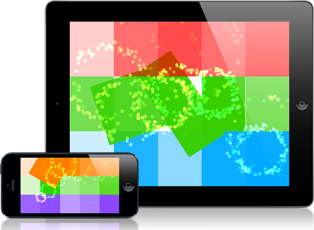
I did manage to put out a few things by Streaming Colour: Finger Tied Jr. (July, 2013), and Baby’s Playful Hands (October, 2013). I was also lucky enough to have Apple ask me for a demo version of Finger Tied that they could put on iPads in actual, physical Apple stores. That was pretty exciting, and being able to see my game on iPads in Apple stores was extremely rewarding.
The rest of my year was spent working with Matt on games for Milkbag Games. At the start of my year six, Matt and I were in the middle of working on a game called Snow Siege. However, by the fall, we both needed a break from the game. We’d been working on it for a year and were still months away from it being finished. At that time I was working on a prototype for a bonus mini-game in Snow Siege. The game was a little scratch card where you tapped on squares to reveal shapes that rewarded you with prizes. The game was so much fun on its own that we started joking about taking the mini-game idea and making it about rescuing cute, pixelated animals. But the more we talked about it, the less it became a joke, and the more it became something we really wanted to make happen. This mini-game became the core of Disco Zoo.
Disco Zoo started as a three-week prototype to test the idea and see if it was fun. Once we were able to play the game, we were convinced that it was something worthwhile and we spent the next three months expanding the prototype into a finished game. We teamed up with our friends at NimbleBit to publish the game, and the game launched on iOS in late February, 2014 to an Editor’s Choice feature on the front page of the App Store. We brought the game to Google Play in April, and between the two platforms we’ve had nearly 3 million downloads so far.
Needless to say, we’ve been extremely pleased with the response to Disco Zoo. Matt and I had a great time making the game, and people seem to really enjoy playing it, so we couldn’t be happier. Some people buy things in the game, so that makes us happy too. 😉
On a personal note, Disco Zoo couldn’t have come at a better time for me, because if the game had flopped, I might have been at the point of having to decide between continuing with indie life or finding a full-time job again. I’m so lucky to be in a position where I can keep doing this. I have said this before, but none of us do this alone. I’m always aware of how much help and support I’ve received from family, friends, journalists, twitter acquaintances, players, and more. I’m extremely grateful to everyone who has supported me in a myriad of ways over the past six years. Because of you, I can continue to do what I love and keep making games for the future. And after all, that’s kind of the whole point.
Here’s to year seven!
Owen
P.S. The title of this post was blatantly borrowed from TOJam 6: “TOJam Sixy Times”. 🙂
Finger Tied Now Available!
Thursday, October 18th, 2012
It is with great pleasure that I can announce Finger Tied is now available for your iPad! It is available, for a limited time, with a special launch sale of 66% OFF!
Fingers feeling nimble? Fingers feeling flexible? Twist, stretch, turn, and tie your fingers in knots to solve these fun puzzles! Are your fingers up for it?
Finger Tied is a multi-touch puzzle game, only for the iPad. In each Finger Tied puzzle, fill in a shape by moving up to four fingers around on your iPad at the same time. But be careful, lift a finger, or go out of bounds, and it’s game over. Finger Tied will test your mental, as well as your finger abilities!
Finger Tied can be played entirely by yourself, but for even more fun, invite some friends over and Finger Tied makes a great party game!
- Finger Tied has 100+ puzzles to test even the most flexible of fingers.
- Fly solo, or ask a friend (or three!) to lend you a hand with the more tricky puzzles.
- Keep your wits about you. You’ll need to turn and twist your fingers, your body, and maybe even your iPad to solve some of these puzzles.
- Create your own puzzles with a built-in puzzle editor.
- Game Center leaderboards let you compare your best scores with your friends’.
Go get it, and let me know what you think!
Owen
Finger Tied Icon Design
Tuesday, September 25th, 2012
I spent much of last week working on the design for the Finger Tied icon. The icon is the first thing potential players see in the App Store, so it needs to grab their attention. It’s worth spending the time to make sure your icon looks good. I’m very pleased with how the final design turned out.
During the process, I had tweeted about how many revisions I had gone through and mused that maybe I’d post the progression when I was finished. A few people wrote back saying they’d like to see that, so this morning I put together a compilation of all the intermediate designs I could find.
So, for those who are curious about how I ended up with this final icon:

Here’s how I got there:

Finger Tied icon design. Top left was the first design, bottom right is the final design.
Owen
Finger Tied Developer Diary
Thursday, September 13th, 2012
I figured it was about time I shared some video of Finger Tied in action. So here, I made this developer diary video just for you.
It goes through a quick explanation of how the game is played and shows some of the puzzles. I hope you enjoy it.
Edit: Several people asked if this was the official trailer for the game, so I’m clarifying: it is not. This is more of a developer diary type video of me explaining how the game works, for those who are interested. The official launch trailer will be released shortly before the game.
Owen
Finger Tied: A History
Thursday, December 13th, 2012
Yesterday I released a big update to Finger Tied (get it on the App Store) which enables the sharing of levels in the game. You can now share the levels you create, and download levels created by other players. I think it’s pretty cool, and I hope the players do too.
As I was working on the update, I started thinking back on the process of creating the game from start to finish. I like it when other people talk, in detail, about the process of creating their games, so I thought I’d do something to share the process of making Finger Tied. I wished I’d kept a diary or journal about the development of the game, but then I realized that I had the next best thing: my commit logs from my Git repo for the game. Every time I check in code or art, I add comments about what I accomplished.
With that in mind, I exported the logs and wrote a little PHP script to generate HTML code of all the commit comments. I’ve also gone back through my screenshots and pulled some that are relevant to given dates. I haven’t edited any of this, so you’ll see references to features that don’t appear in the finished game, because I decided to cut them.
The first commit comments are from Guelph Game Jam 3, in April, where I first prototyped the game. It was a game about planting flowers, called Trillium Fillium. From there you can see it involve into something more abstract and into the final game.
This post is long. I wouldn’t blame you if you don’t read it. I hope one or two of you find it interesting. 😉
Finger Tied: From Start to v1.1
Wed Apr 11
Sun Apr 15
Original Prototype created for Guelph Game Jam 3 (Apr 15, 2012).
Fri Apr 27
Mon Apr 30
Tue May 1
Wed May 2
Fri May 4
Sat May 5
Mon May 7
Tue May 8
Wed May 9
Sun May 27
Wed May 30
Fri Jun 1
Mon Jun 4
The style of the game is starting to come together.
Tue Jun 5
Wed Jun 6
Thu Jun 7
Fri Jun 8
Main Menu design is largely what shipped, though obviously with different colours.
Tue Jun 12
New colour palette is in the game.
Wed Jun 13
Fri Jun 15
Tue Jun 19
Wed Jun 20
Thu Jun 21
Fri Jun 22
Wed Jul 4
Mon Jul 16
Tue Jul 17
Wed Jul 18
Fri Jul 20
Mon Jul 23
Post Game screen. It’s becoming clear that lanscape orientation is becoming problematic.
Tue Jul 24
Wed Jul 25
Fri Jul 27
Game has been reworked to render in portrait orientation, making everything better.
Mon Jul 30
Tue Jul 31
Wed Aug 1
Fri Aug 31
Tue Sep 4
Thu Sep 6
Fri Sep 7
Mon Sep 10
Tue Sep 11
Final layout of the Level Select menus.
Wed Sep 12
Thu Sep 13
Fri Sep 14
Mon Sep 17
Tue Sep 18
Fri Sep 21
Sat Sep 22
Mon Sep 24
Tue Sep 25
Evolution of the icon design.
Fri Sep 28
Sat Sep 29
Sun Sep 30
Tue Oct 9
Fri Oct 19
Wed Oct 24
Fri Oct 26
Mon Oct 29
Tue Oct 30
Wed Oct 31
Fri Nov 2
Tue Nov 6
Fri Nov 9
Tue Nov 20
Mon Nov 26
Wed Nov 28
Fri Nov 30
Sat Dec 1
Sun Dec 2
Mon Dec 3
Tue Dec 4
Wed Dec 5
Fri Dec 7
Posted in Art, Business, Design, Finger Tied, ipad, Marketing, Misc, postmortem, Project Management, Technical | Comments Off on Finger Tied: A History